Homelab Baremetal Provisioning
The motivation behind this project was that I wanted to move away from manual “button-clicking” and towards infrastructure that I can rip apart and build again from scratch. The goal was simple: minimal-touch bare metal provisioning. I pre-register MAC addresses and do a manual power cycle per node, but beyond that, each machine provisions itself and joins a production-ready Kubernetes cluster without me ever running an installer by hand.
My homelab runs on 4 mini PCs — one designated as the Manager Node and three as Kubernetes cluster nodes.
If you’ve worked with Linux before, you know the drill: boot from USB, follow the interactive installer, repeat. That works fine for one machine — but it doesn’t scale. With a fleet, you’re walking machine to machine, plugging in drives, and clicking through the same prompts over and over. It’s tedious and error-prone.
That got me thinking about how cloud providers do it. When you spin up a VM on AWS or GCP, you get a machine ready to SSH into within minutes — no USB, no installer, no interaction. When you’re done, you shut it down or replace it with a fresh one. I wanted that same experience on bare metal. That’s what led me to Tinkerbell.
Here is how I layered Autoinstall, Tinkerbell, Talos Linux, Ansible, and Flux CD to make it happen.
The Architecture: A Three-Layer Cake Link to heading
My workflow is broken down into distinct stages of responsibility, ensuring that if one layer fails, I know exactly where to look.
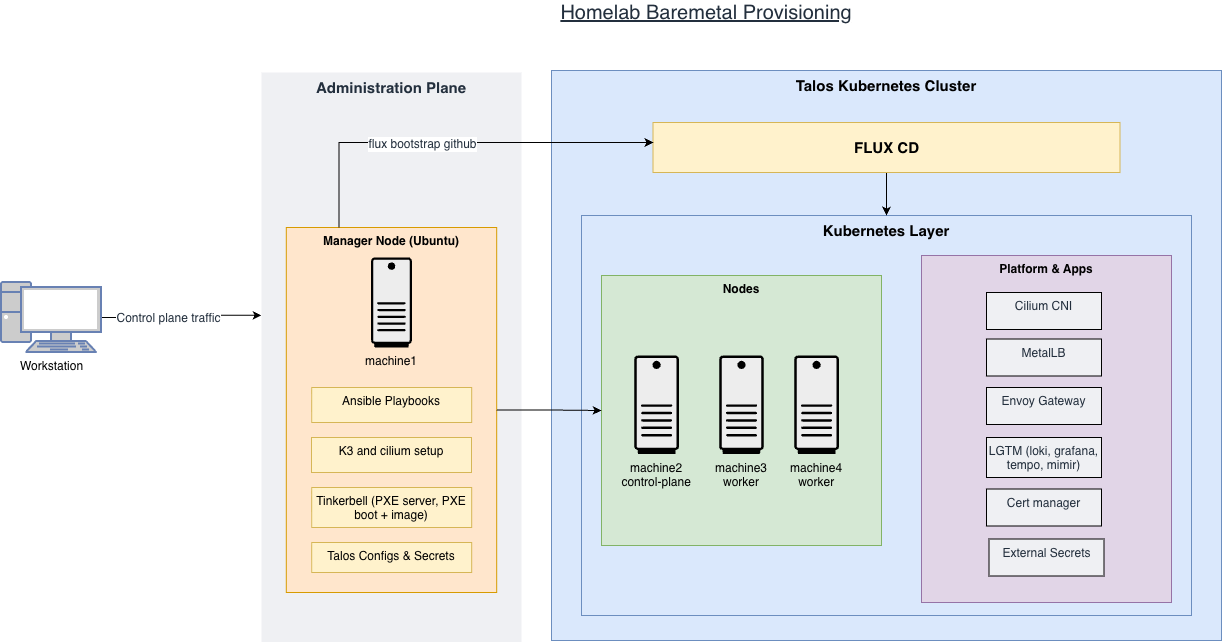
1. The Provisioning Layer (Tinkerbell & Ansible) Link to heading
Everything starts on my Manager Node (Ubuntu). Autoinstall handles the Manager Node OS installation — injecting SSH keys and configuring sudo permissions so Ansible can run cleanly from the start. I chose to run Tinkerbell on the Manager Node specifically because Tinkerbell requires L2 network access to handle DHCP and PXE booting, so it needs to be on the same local network segment as the nodes it provisions.
Once the Manager Node is up, I use Ansible as the primary orchestrator to manage installing auxiliary services and tooling:
- K3s for hosting Tinkerbell and monitoring stack
- Tinkerbell Templates, Workflows, and Hardware definitions (with pre-registered MAC addresses), which handle the PXE booting and image distribution to the three cluster nodes.
- Talos tooling and configuration
- Cilium and Flux bootstrapping on Talos Kubernetes cluster
2. The Operating System (Talos Linux) Link to heading
I chose Talos Linux for the cluster nodes specifically because it is immutable and “headless.” There is no SSH and no shell—only an API. This reduces the attack surface and ensures that the OS state is consistent across my control plane and workers. Ansible handles the talosctl apply-config and initial bootstrap to get the cluster talking.
3. The GitOps Layer (Flux CD) Link to heading
Once the cluster is alive, Ansible performs a flux bootstrap. This is where the “magic” happens. Flux points to my private Github repository that contains my Kubernetes manifests and begins a multi-stage reconciliation:
- Infrastructure: Setting up the “must-haves” like Cilium CNI, Cert-manager, MetalLB, Envoy Gateway, and Longhorn for storage.
- Infrastructure-Config: Applying the actual Gateway classes and IP pools.
- Platform: Deploying my observability stack (Prometheus, Loki, Tempo)
Why this matters Link to heading
Building this wasn’t just about having a cluster, it was about building a workflow that allows me to quickly tear down and set back up without sacrificing extensibility and security. Talos allows you to integrate new extensions, upgrade the Kubernetes cluster version, and explicitly grant permissions. Because the Talos nodes are stateless, I can lose a machine, re-provision it via Tinkerbell, and Flux will automatically bring all the networking and apps back to the desired state within minutes.
| Stage | Time |
|---|---|
| Provisioning manager node | ~5 minutes |
| Executing Ansible playbooks | ~5 minutes |
| Flux setting up platform and app services | ~5 minutes |
What’s Next? Link to heading
Looking into the following:
- Set up vcluster to help with experimenting Kubernetes API features. I can have one cluster in 1.35, another in 1.36 and so on.
- Continue to play with Talos extensions and CLI
If any of this resonates with your own homelab journey or you have questions about the setup, feel free to reach out — I’d love to compare notes.